How To Time Block Your Day To Get Work Done In Your Business
how to manage your time with scheduling and have enough time to do everything
scheduling is the best method to plan your time and get stuff done in your business and life
what you’ll learn in this article:
-what is time blocking
-why is it the best way to plan
-step-by-step tutorial to block your calendar like a pro
-best practices & mindsets to have/ do to get the most of it
What is time blocking /scheduling?
what is meant by time blocking
it’s a planning method in which you use a calendar to plan your days and weeks into time blocks that you can easily follow through with it
Why is time blocking/ scheduling the best way to plan
what are the advantages of blocking your time?
There are so many reasons here are some of my own:
1- you can easily make changes and you won’t create a mess on it
if you change things on it unlike a paper calendar
2-easily access anywhere.
you can have it with you at all times since it is digital
you’ll always be one touch away from knowing what to do next
3-you can easily see your 24h and what time is available
or not for you to work, sleep and do the other things
4-it constrains you.
you can’t add an endless amount of tasks unlike a to-do list where you can add without bound
5-you can sync it with other softwares for meetings & Appointments and such
6-don’t induce overwhelm or confusion like a to-do list do
7-easy to follow through with it

Basics of time blocking & how to make it useful for perfectionists
The step-by-step process of Scheduling daily routines and tasks
I time block using google calendar but you can do the same on any other calendar
here is a tutorial on how to time block:
1-create new calendar
by clicking on the 3 strips on the top left corner then the plus calendar beside other calendars tab
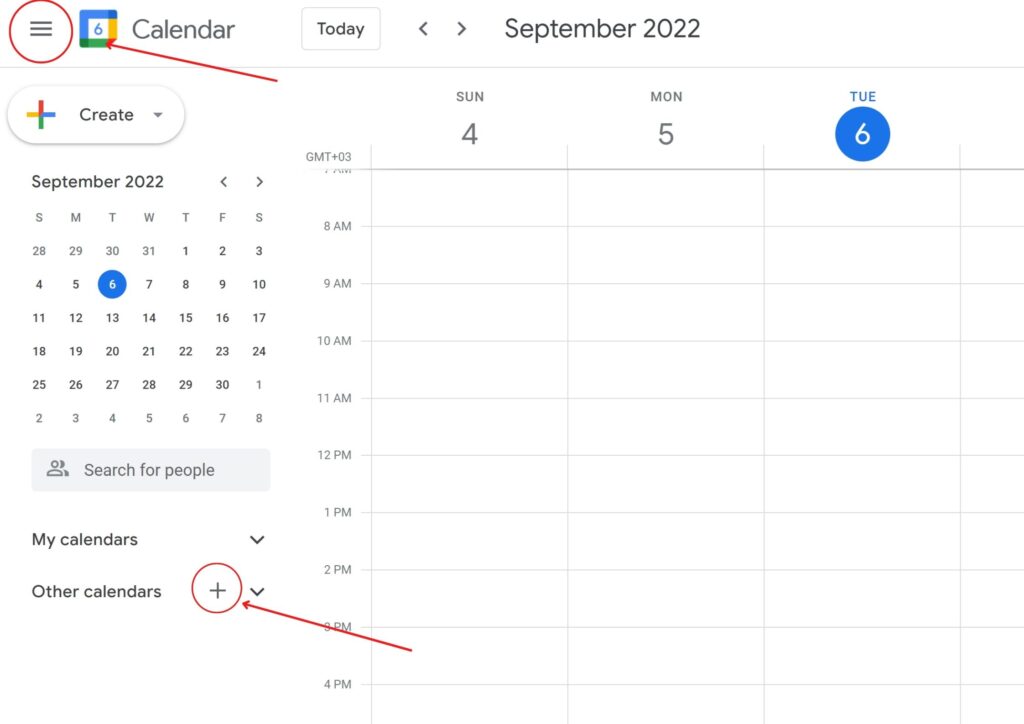
Make as many as you want but don’t go overboard and overwhelmed yourself
I recommend no more than 5 that will cover your basics
For me, I have one called get stuff done ( for scheduling the majority of my tasks )
I have appointments one ( for calls and other commitments with others and meetings)
I have one for editorial & creative activities in my biz like writing content, editing…
I have one for health & wellness for workouts, meals, sleep…
I have one for personal growth & learning for activities such as journaling, coaching,…
I have one for out-of-the-office activities for anything I do outside as the name implies
I have one called house chores for anything related to the house
That’s should cover your bases in business and life
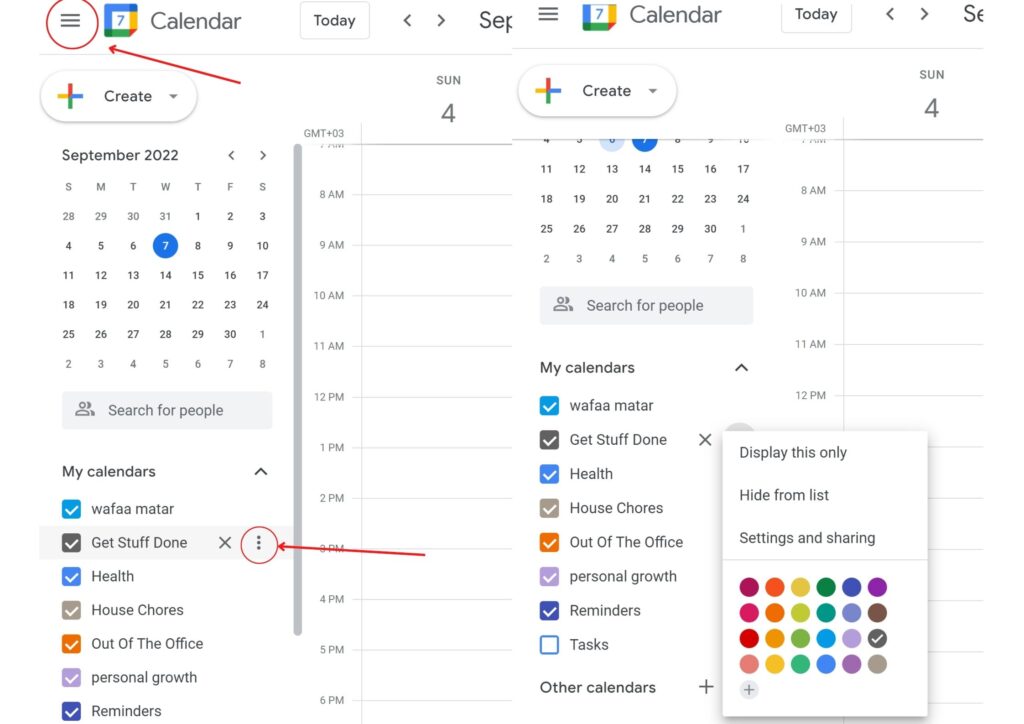
2-color each one differently
Click the 3 strips again then go to every calendar you created after that
hover above each one following this click the 3 dots beside each one then choose a colour
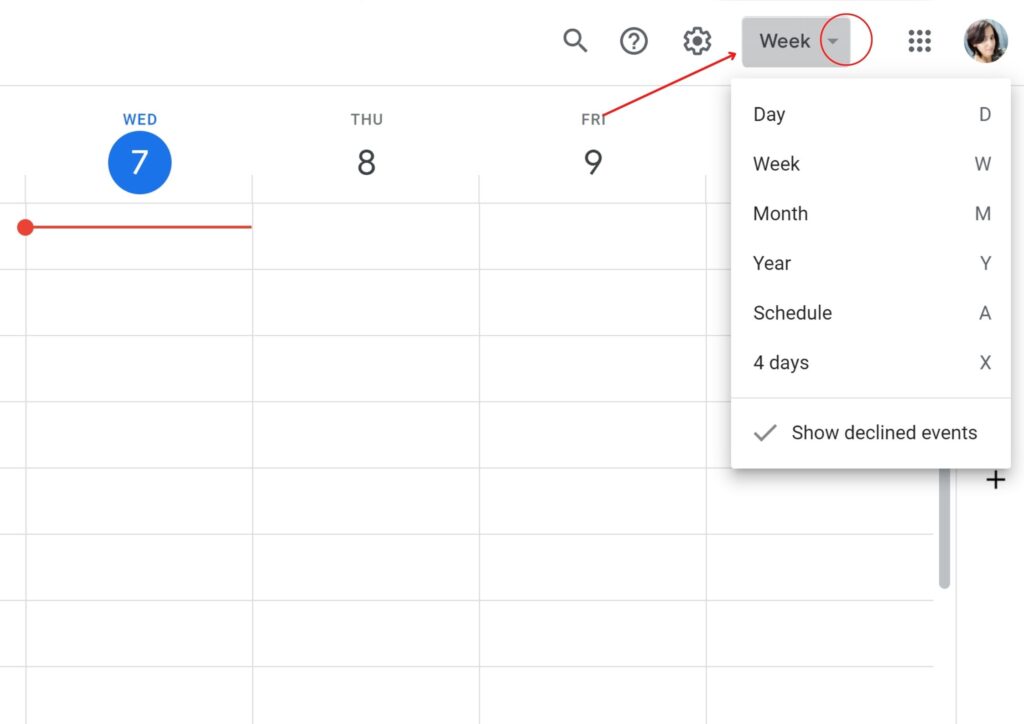
3-switch to weekly view that’s where you will start scheduling and block your time
It helps you see your week in advance and make changes during the week and the day it covers both
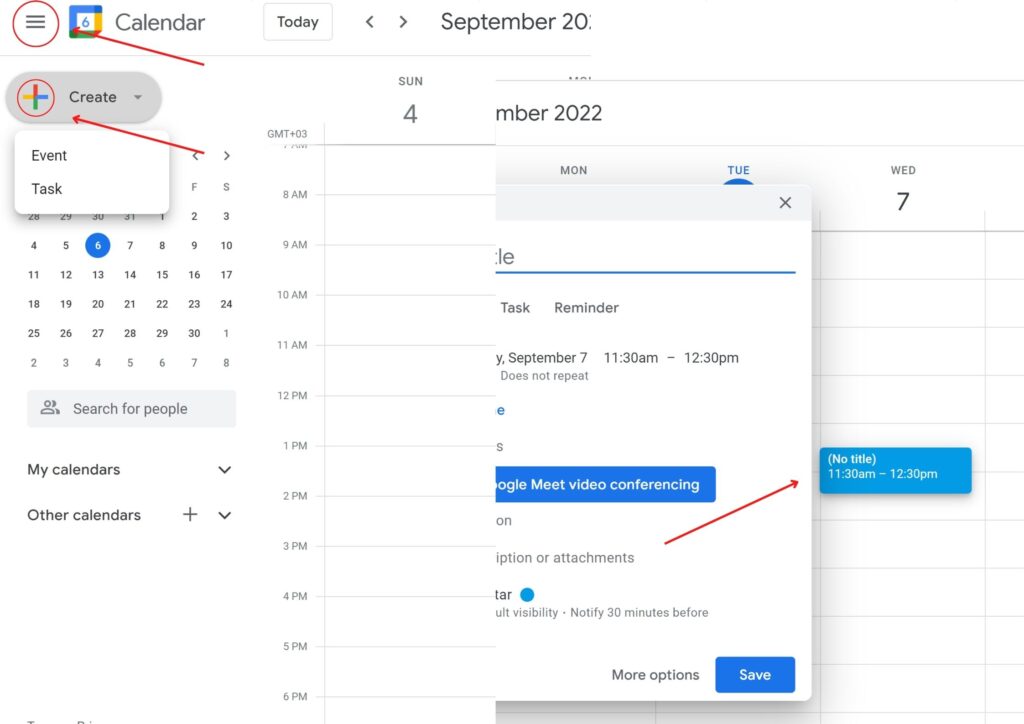
4-start time blocking
by clicking on the plus( create ) icon on the top left side and then choosing event
or just clicking any space on the calendar
Make each task clear, precise and outcome-oriented such as the following
Example
To plan your week properly as a perfectionist follow the method described in this blog post
To prevent the task from stretching i.e the block extends to the next day
Then make sure the task is scheduled on the same day
5-use the task feature to divide a long block into different small tasks

By clicking on the create (plus) icon on the top left side then task(video show)
6-schedule repeated tasks once

by clicking on the create (plus) icon on the top left corner and
then choose event under the time you’ll find the frequency tab
after that choose which one suits you or make a custom one
for things that you do daily choose the frequency daily
so, you don’t need to repeat scheduling it manually for the same task
as shown in the photo above
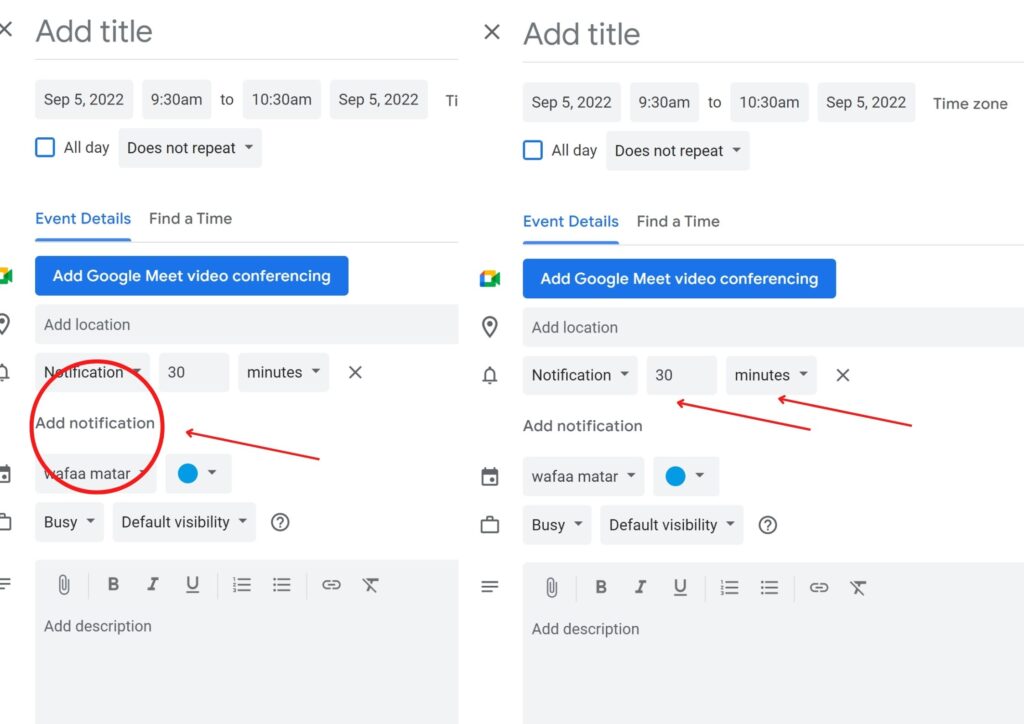
7-add notification to important tasks by choosing notification in the event itself
click any task you scheduled or you can do it from the beginning.
Click add notification and choose the length
8- sync different calendars
Click the 3 strips at the top left corner
then go down to other calendars
Click the plus icon after that click import, from a URL

That cover the basics on how to use google calendar, pretty easy, right!!
Now, let’s move on to the best practices, and mindsets to use/have
in order to get the most of your time as a perfectionist entrepreneur
tips to get the most of time blocking/ scheduling
1-be flexible
As perfectionists, we tend not to want to make changes and ruin things
but you need to make changes to your schedule as it needs to during the day and the week
If something didn’t work out as planned change the time and make adjustments to the schedule
and continue working don’t stop
or distract yourself if things didn’t go perfectly
i.e. as planned instead keep going with your plans
–be flexible with the start time if you didn’t exactly start at the exact time you scheduled change it to another time
so, you don’t exhaust yourself and end up throwing the towel
–daily update your calendar based on
what happened and write things on it even if you did nothing
2-stick to constraints and deadlines
-set deadlines and stick to them, especially the ones that are for you.
it’ll help you build self-trust and get more done without pressure and overthinking
It’s something I am actively working on at the moment
by setting an end to the workday, doing certain tasks by a certain date and not moving it
which can be a challenging one since when you work for yourself you don’t have anyone enforcing it
and that shows you how much you care about people and the consequences when it comes to them not when it is about you & for you
-learn to stick to the time you blocked and get the work there,
especially things you already know how long they take you to get done
3-to follow through
If you think that you always fall off the wagon or you always mess things up in your biz.
Start by noticing when you do follow through>>> note it and write it down in your weekly review
to build your self-trust & belief about your ability to follow-through
most often we dismiss many of what we do just because it wasn’t perfect follow through
or the work wasn’t to our standards when we have already done it and that’s what matters
Know that follow-through goes back to your planning.
are planning in a way that triggers your perfectionist mindset and keeps you from following through
or are planning in a way that helps you overcome it
If you don’t know, don’t swear it. I have a complete guide on how to properly plan your week as a perfectionist
so you don’t let planning to be the reason you’re not following through
click Here to read how to properly plan your week
4-overcome perfectionism. I have an IG post about it where you’ll get a brief intro about what is it and why you have it Here
Also here is the self-sabotaging behaviours blog post that perfectionists fall into and how to overcome them
5-add rest to your schedule to help your brain to breathe so, you can be productive
Our brains can’t work 24h so, give them rest.
block specific time each day to rest and do whatever you want but that time isn’t your sleep time only.
Having regular 7-8 hours of sleep
will make a huge difference in your concentration and focus + retention
6- be active. Walk, work out, and pick up any fun sport to move your body
and help you improve your concentration.
I found I am the most focused and concentrated after being physically active.
7-keep a distraction journal to write any distraction thoughts
that come up as you get to work and follow through with your plans.
8-use a timer to get things done faster.
It serves as an accountability buddy and can use as a motivator
Tell yourself that you’re done after the alarm rings ( reward to what comes after)
9-be realistic in terms of the time you block for things
especially for the things that I know how long they usually take me to get done
because I have done them before or similar tasks
eg. publishing a blog post, writing content, writing copies
and for tasks, you don’t know how much time they’ll take >>> in this case you make a hypothesise
and see if the amount you blocked was enough or not and how much you really need it
and can add buffer time right after just in case it takes more
10-put breaks between mentally taxing tasks in your calendar
11- ask yourself these questions to help you determine the task important or not:
is this getting me closer to my goal? am I afraid to do it?
can I schedule it for later?
what are my 5 priorities?
and how much time do I want to devote to it
That’s should set you up for a good start or help you improve
if you are already versed in using a digital calendar & time blocking in general
I offer coaching for entrepreneurs to help them increase
your productivity and stop sabotaging yourself to reach your goals
My program will help you with the mindset stuff that holds you back
without knowing that is holding you from experiencing your full potential
thus increasing your productivity
plus will help you understand what works for you in terms of your productivity and capitalise on it
to get things done
Specifically doing what matters rather than doing busy work
If you’re you are ready to take your productivity and mindset
to the next level then my program is for you
To your greatest success
Wafaa


You May Also Like

How To Finally Set Goals That You Actually Achieve And Plan Them

How Can You Get Rid Of Bad Habits? 3 Methods To Eliminate Bad Habits Easily